
Want to start an Etsy Shop and sell things on Etsy?
Yeah! It’s possible to do!
After all, What’s better than following your passion and making a passive income along. (and in future it can be your sole source of earning, God Knows!)
From the last years, BuildMeBig (“Small Shop. Massive Impact.”) has helped millions of users like you to start an Etsy Shop of your own.
People start selling on Etsy for many reasons, and some of the most popular ones are:
- Offers a low-risk entry into e-commerce for independent creators
- Turn a creative hobby into a side hustle or full-time business
- Passive income and making money
- Turn passion in profession
Or any other.
Your’s could be one of the above, or some other reasons, either way, sell things on Etsy could help you achieve your goal.
So, without further delay, let’s learn how you can start an Etsy shop today.
A few things:
This is a detailed guide with some theory and practical knowledge. A bit of reading, and a bit of following steps to start your Etsy shop.
This is just one thing you need before we start:
- The name of your Etsy Shop
Note: You can always change your Etsy Shop name up to 5 times in the future if you like.
In this guide, you will find answers to all these questions and will be able to start a shop.
Here are the steps to start an Etsy Shop:
- Step 1: What do you sell on Etsy Shop? (Niche)
- Step 2: Create your Etsy account and shop
- Step 3: How to set up your storefront
- Step 4: Understand Etsy fees and pricing
- Step 5: How to price products for profit
- Step 6: Create high-quality listings that sell
How To Start An Etsy Shop From Scratch and with No Experience
This shop creation guide is created for users like you who are just starting out and knows little or nothing about selling on Etsy.
Within the next few minutes, you will have your Etsy Shop up and running.
Step 1: What do you sell on Etsy Shop? (Niche)
The very first thing you need to do is find the niche of your shop. By niche, I mean finding product listings that your shop is going to be about.
I hope you don’t plan to sell every random thing and make money. This doesn’t work in 2026 and your chances of success are better when you sell on a single theme.
You might be a jack of all trades, and want to sell multiple products, but it will not be fruitful, as people like to buy from the shop, which is an authority on a particular topic/theme/niche.
Moreover, Etsy prefers a shop that is selling on a single theme. For example, BuildMeBig topic is “ETSY,” and that’s how you found us.
NOTE: Etsy serves as a platform where items are crafted, designed, curated, or sourced by individual sellers.
Now, the big question is
how to find the niche of your Etsy Shop?
Here are a few tips that will help you to get started:
- Find a product that you know better than anyone else. It doesn’t have to be the job you are doing, and it could be anything. Try to think about the product that you most like to talk about, and you can comfortably work for hours.
- The good idea is to pick a topic that you usually read about. The topic which you read about all the time is something that interests you.
- Also, make sure you have a keen interest in a particular topic, and you can add value with your own insight.
- For newbies, I always recommend taking the help of pen-paper and writing down the product listings in different columns that you like.
For ex: Personalized Jewelry, Digital Products & Templates, Custom Apparel, Home & Living Deco, Craft Supplies, Pet Personalization, Weddings/Party, Paper Supplies and so on. Now, try to write 5 product ideas for those different columns. When you are writing the product title, think about what you can create without taking reference. By the end of the 5th product, it will help you to find the topic (Niche) that you like the most.
This is a critical step before starting a shop, as it will help you to pick a niche that you are most passionate about.
This will ensure that you will not burn out when your shop goes live.
If you are picking an idea that you like to talk about and work about, it will ensure that your burnout period will never come. So, I assume you have selected the niche for your shop which can make some money for you.
You can also test interest by creating a few draft product listings and asking for feedback in relevant communities. Validation reduces guesswork and gives your new shop a smarter starting point.
Beginner Tip:
Start with digital products on Etsy because they require no inventory and very low upfront investment.
Conclusion: Selecting the appropriate niche is the first and the most important step in starting a new Etsy Shop.
Suggested Read: How to find high-demand, low-competition products
Step 2: Create your Etsy account and shop
NOTE: You need to set up your shop using a desktop web browser. Once your shop is set up, you can manage your shop on the Etsy Seller App.
Once you’ve found your Niche, it’s time to lay the groundwork for your Etsy store. This is where you make sure everything is set up just right from the start, so you can concentrate on selling and not on troubleshooting later on.
How to sign up as an Etsy seller
First, set up a regular Etsy profile. Then, just follow the prompts to open your store and create your Etsy seller account.
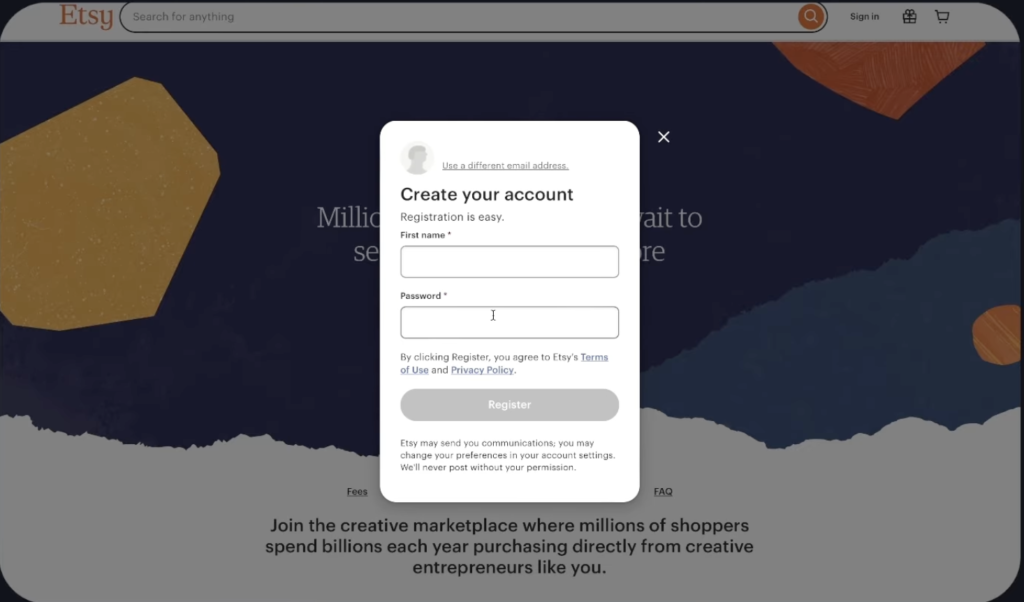
Etsy will request several essential details from you, including your shop’s country of origin, language, payment methods, and bank account information for processing your earnings.
Set your shop preferences
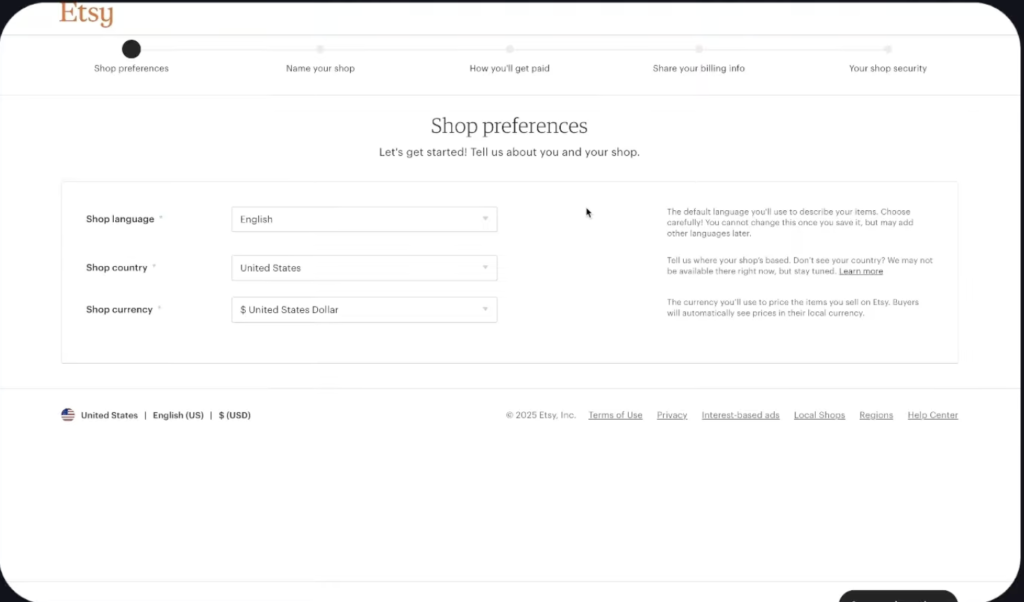
Select your shop’s language, country, and currency:
- Shop language: Think of this as the default way you’ll be talking about your items. Make sure it’s a language you’re happy to chat with buyers in. You can’t switch it later, but if you want to add translations in other languages, you can sign up for those after you open your shop.
- Shop country: Pick the country where you’ll be running your shop.
- Shop currency: Decide on the currency you’ll use to price your listings. Keep in mind that there might be fees for converting currency if your bank’s currency is different from your shop’s.
Picking up Shop name for you Etsy Shop
Etsy Shop Name:
There are 4 rules that I usually follow when picking a Shop name:
- Easy to remember
- Easy to type
- Easy to pronounce.
- Easy to brandable
Good names suggest a category or vibe, not a single item.
Shop name should be:
- 4-20 characters in length
- No spaces or special characters
- No profanity
- Not already in use by an existing Etsy member
- Does not infringe on another’s trademark
If the shop name you entered is in use, you will see suggestions for other shop names that are still available. Your shop name will be held for you while you open your shop.
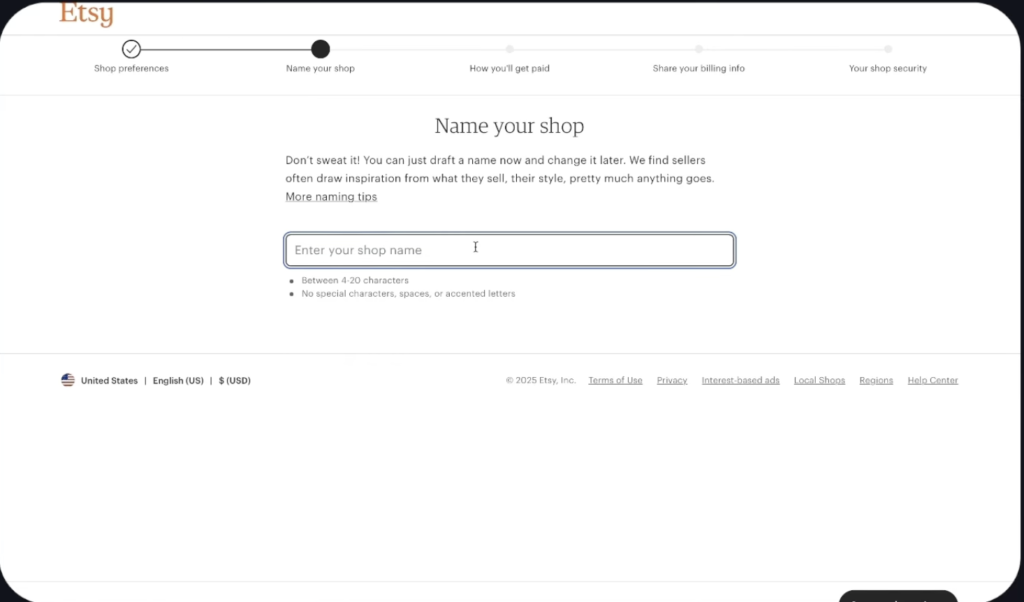
Note: You can always change your Etsy Shop name up to 5 times in the future if you like.
Set up your payment and billing details
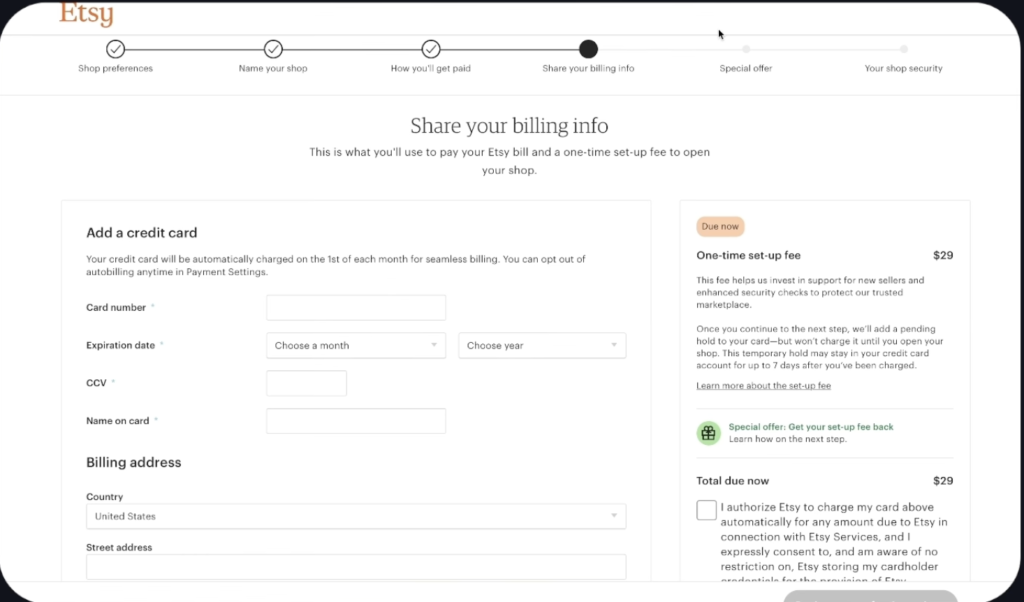
To receive payments on Etsy, you must connect your bank account to your Etsy shop. Additionally, you will need to add a debit or credit card to your account for paying bills from Etsy.
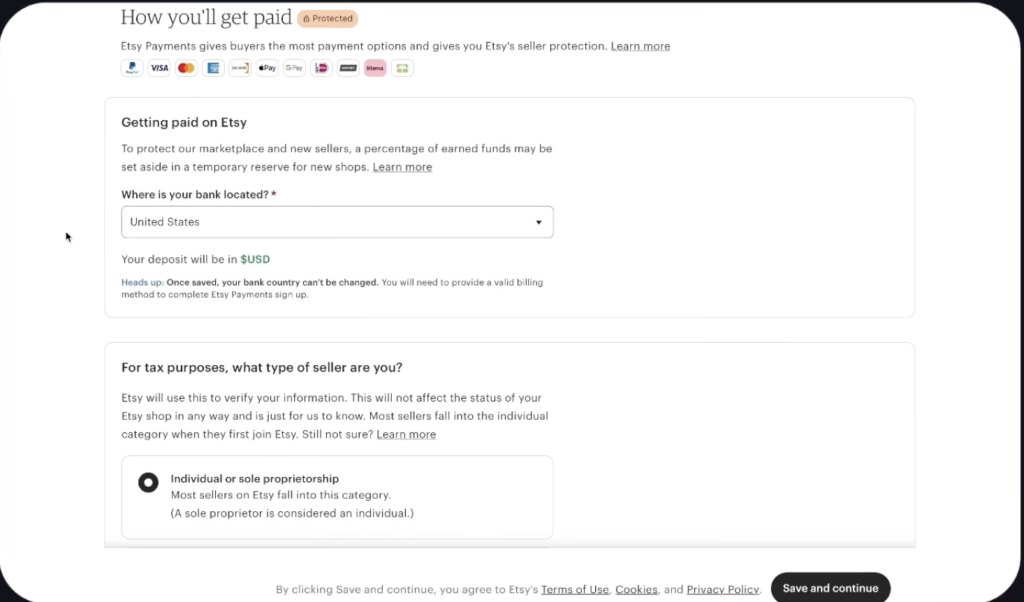
To connect your bank account:
- Select the country where your bank is located from the “Where is your bank located” dropdown.
- In the “For tax purposes, what type of seller are you?” section, choose whether you are an individual, sole proprietorship, or incorporated business.
The steps to set up payments may vary depending on your location.
Sellers with US bank accounts
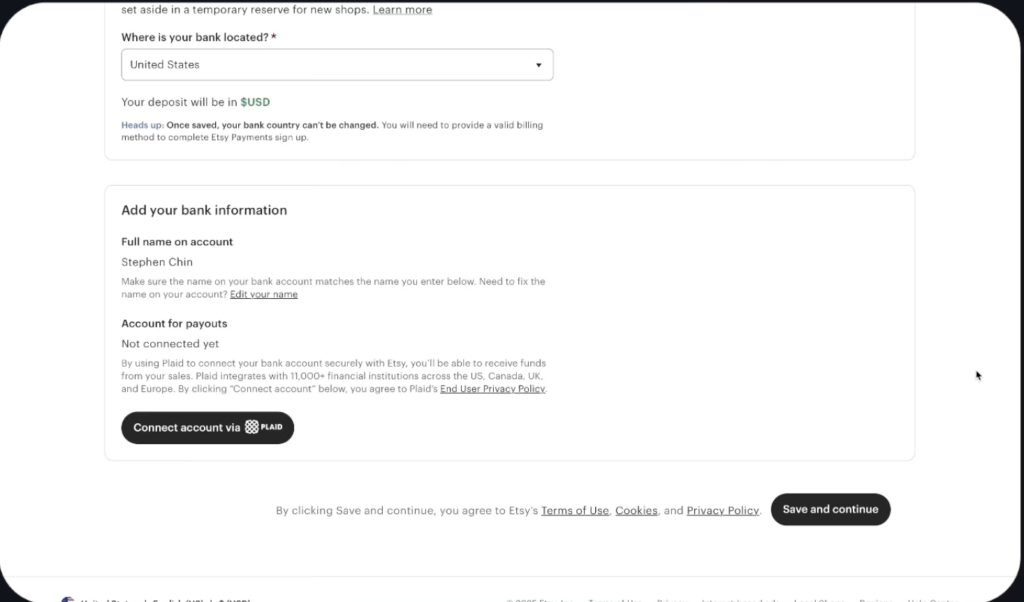
US sellers incorporate bank details by utilizing a third-party service provided by Plaid. Plaid facilitates the verification of bank details with the seller to ensure the timely receipt of deposits. For further information on Plaid’s security measures, please refer to the relevant section.
Upon selecting your bank information, proceed to connect your bank account with Plaid and follow the provided instructions to add and verify your bank details. Additional guidance on updating your bank details can be found in the corresponding section. By utilizing Plaid to verify your bank account details, you acknowledge and agree to Plaid’s terms and conditions, including its Privacy Policy.
Sellers in Australia
In Australia, sellers are required to maintain a residential address on file with their Australian bank. This address serves as the designated location for Etsy Payments. It is imperative to note that we do not accept PO boxes as residential addresses.
To update your address, please navigate to the Payment settings within your Shop Manager.
Sellers in select countries
You can register for Etsy Payments using a Payoneer Payment Account in the following countries:
- Argentina
- Brazil
- Chile
- Egypt
- Georgia
- India
- Japan
- Kazakhstan
- Pakistan
- Peru
- Serbia
- South Korea
- Thailand
- Ukraine
- United Arab Emirates
If you select any of these countries from the “Where is your bank located?” section, you will be prompted to connect your Payoneer account. From there, you can log in to an existing Payoneer account or create a new one.
Once you connect your Payoneer account to your shop and your information is verified, you will be enrolled in Etsy Payments.
What if Etsy Payments isn’t available in your country?
Etsy shops can only be established in countries where Etsy Payments is available. Currently, Etsy offers payment services in a limited number of countries. Sellers using Payoneer may be subject to Payoneer’s withdrawal minimums and additional fees. For comprehensive information on Payoneer’s fees and withdrawal procedures, please log into your Payoneer account. Additional details regarding applicable Payoneer fees can be found there.
Other sellers outside the US
- Under Your bank information, enter your bank account details.
- Select Save and continue.
- Add a credit or debit card.
Note: If you’re a new seller in Germany, Austria, or the Netherlands, you’ll need to link a credit or debit card to your account.
To make sure your sales funds arrive safely and soundly, please double-check your bank details.
If you’ve already got a credit or debit card set up, you can easily add a prepaid card to your account from the billing setup page. Just a heads-up, non-reloadable prepaid cards aren’t the best choice for your main payment card, but you can always pay your bill manually with one.
If you’re having trouble adding a reloadable prepaid card, maybe try adding another card first?
After Adding Billing info:
Upon providing your billing information, a one-time, non-refundable shop setup fee is required. Please select the checkbox in the “Total due now” section to authorize this one-time payment and complete the shop setup process.
If you are using Payoneer, the Etsy onboarding fee will be in USD. Taxes may be applicable.
A confirmation of this transaction will be sent to the email address you registered when opening your shop, and your payment will be reflected in your Payment account.
Verify your identity
Verify your identity before setting up your shopfront. Etsy partners with Persona to run identity and fraud checks. Provide a photo of your government ID and a clear selfie during onboarding. Persona compares your ID photo to your selfie to ensure they match.
Once your identity is verified, you’ll be able to continue setting up your shop.
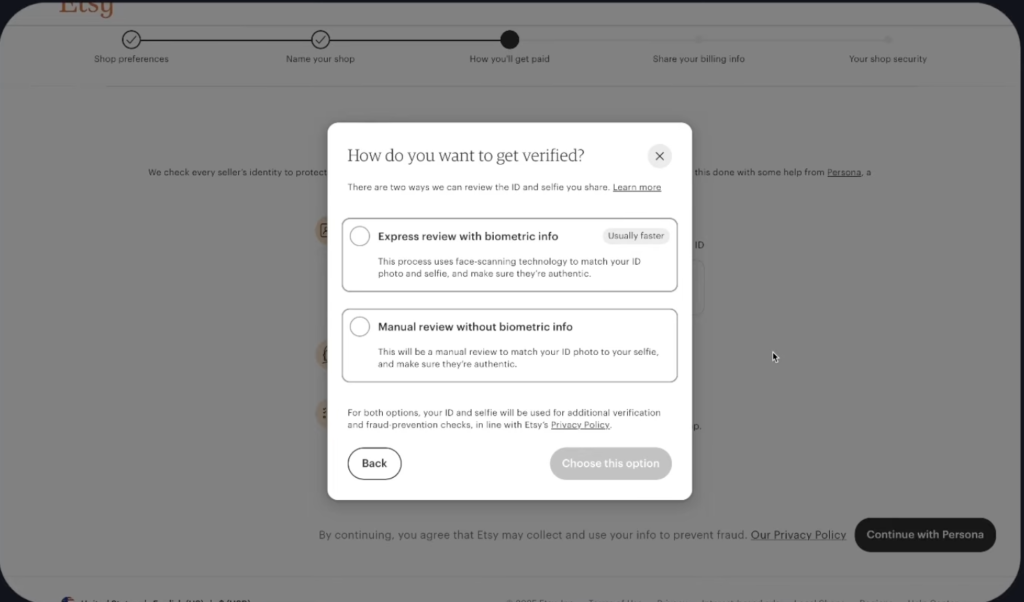
To verify your identity:
- Choose between Express review with biometric info, and Manual review without biometric info.
- Select Choose this option.
- Select Begin verifying.
- Choose the country that issued your ID from the dropdown and select Continue.
- Select an ID from the list that you want to share. The ID must not be expired and needs to match the name on the bank account you added to get paid.
- Choose how you want to upload your ID photo. If you need to switch to a device with a camera, select Use another device and select how you would like to receive a secure link to continue your verification – either through SMS or email.
- Select Continue with Persona to begin the verification process.
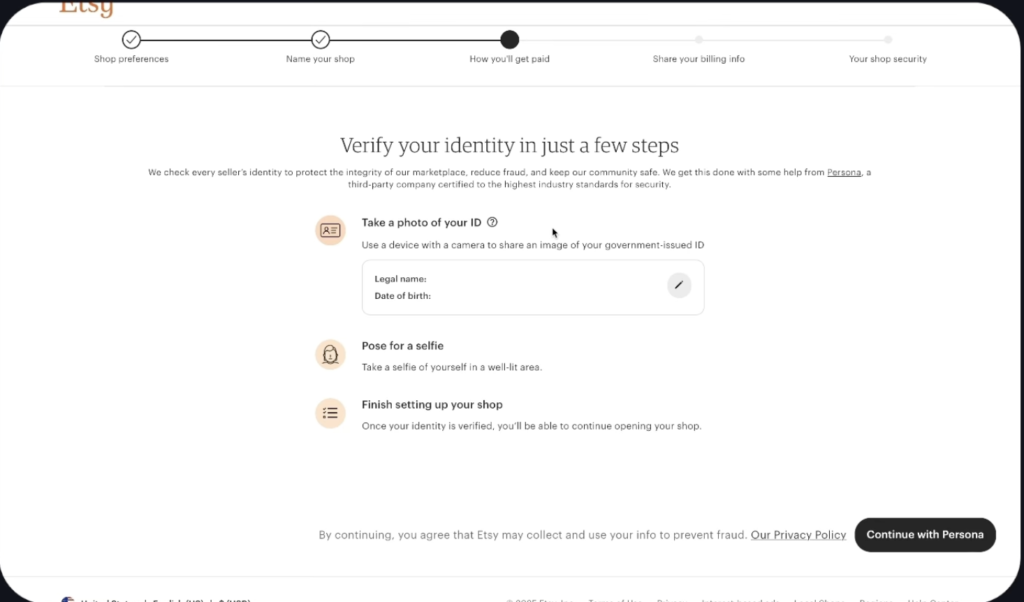
You can continue to set up your shop while the ID and selfies you submitted are reviewed. Once you open your shop, you can check your verification status in your Shop Manager from the Legal & tax information page.
Turn on two-factor authentication
To keep your account safe, Etsy need you to enable two-factor authentication. If you try to log in from a browser or device that Etsy don’t recognize, you will receive a verification code to enter before you can access your account. You can get this code through:
- An authenticator app on your Android or iOS device (Recommended)
- An SMS
- A phone call
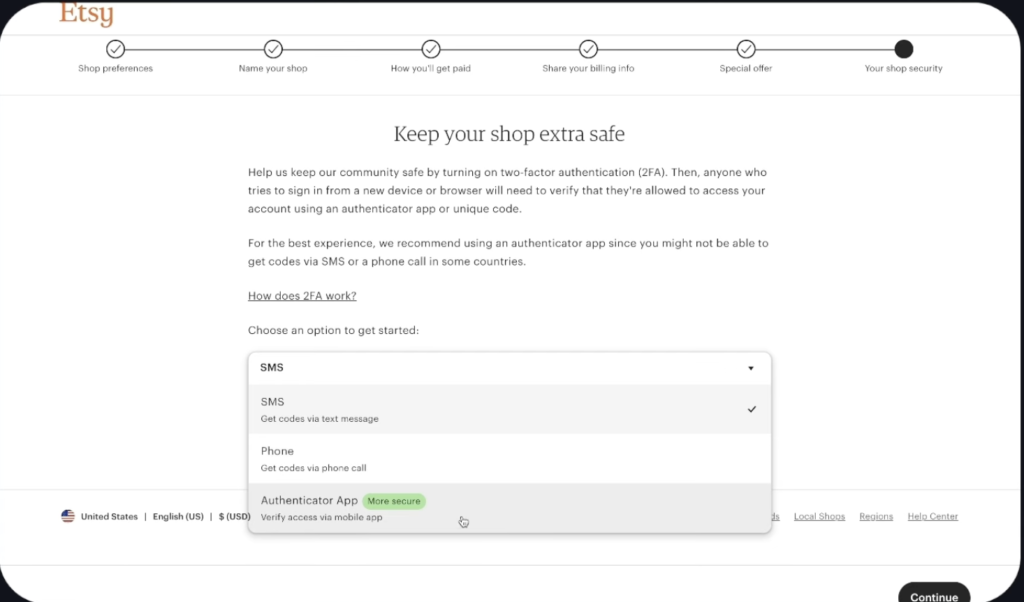
Great job on getting this done! Now, just click on “Open your shop.” You’re all set to start setting up your shop!
Step 3: How to set up your storefront
After you’ve signed up to sell on Etsy, there are a few things you’ll need to do to get your shop all set up and ready to start selling. Making your shop look unique is super important for showing off your brand and making your customers feel confident in your products.
Your shop to look:
- Shop Icon: Showcase your shop’s unique identity with a logo that truly represents what you offer.
- Shop Banner: Make sure your products shine! Use a banner to showcase them in action or with a cool, stylized shot.
- Shop Story: Share your story with potential buyers—tell them about who you are, what sparks your creativity, and how you bring your ideas to life.
- About section: Feel free to upload videos or photos and share the story behind your products, how your business started, and what you’re dreaming up for your brand.
- Shop members: Let’s get to know each other better by introducing any other team members or collaborators you work with.
Step 4: Understand Etsy fees and pricing
Pricing can be tricky for new sellers! Knowing what Etsy charges can help you avoid setting prices too low and feeling frustrated when sales start rolling in.
Breakdown of Etsy seller fees
Just so you know, all sellers share the same basic fees, no matter if you’re selling just one item or a whole Etsy shop.
Listing fee
Every product listing costs $0.20 to publish. That fee also applies each time a listing renews. Listings stay active for four months or until the item sells. If you sell multiple quantities, Etsy automatically renews the listing and charges another $0.20.
Transaction fee
When you sell something on Etsy, they’ll take 6.5% of the item price, which includes the shipping you charge. This is their share for helping people find your shop and keeping the marketplace running smoothly.
Etsy Payment processing fee
If you’re using Etsy Payments, which is common for sellers, there’s a payment processing fee. This usually takes a cut of the total order amount, plus a small, fixed fee. The exact fee can vary depending on where your shop is located, but it usually falls between 3%-4% plus a set amount for each transaction.
Optional advertising fees
When you run Etsy ads, you only pay if someone clicks on yours. This fee is up to you and can be adjusted based on your daily budget. Plus, some shops can get off-site ads, where Etsy promotes their listings outside of Etsy and earns a higher share if a sale happens through that ad.
Currency conversion and other charges
If your bank account is in a different currency than your shop, Etsy might charge a tiny conversion fee. These fees can differ depending on where you are and how you pay.
One common mistake new sellers make is not considering fees when they set their prices. So, let’s explore some pricing strategies to help you run a successful Etsy store.
Step 5: How to price products for profit
First, let’s figure out the true cost of each product. This covers everything from making it to shipping it, plus Etsy’s fees and the profit you’re aiming for. Setting your price just to match the lowest listing can actually hurt your profits. A fair price is key to growing your small business over time, not just getting that first Etsy sale.
Now, take a peek at what other people are selling that’s similar to yours. Don’t just focus on the price—compare the photos, how personal you can make them, how quickly they ship, the packaging, and what customers are saying about them. If your product is a cut above the rest in design, shipping speed, or customization, you can justify a higher price.
It’s all about testing. Experiment with small price changes and see what happens to how many people look at your listings and how many decide to buy. Etsy makes it super easy to change prices, so use that to your advantage. Make sure you have some room to play around with Etsy ads later on, so you can tweak your listings without losing too much money.
Common mistakes to avoid:
- Forgetting fees when setting prices.
- Competing only on price instead of value.
- Ignoring time spent on design and customer support.
Thoughtful pricing gives you room to grow without pressure.
Confused about what to sell first? Read our guide on beginner Etsy product ideas.
Step 6 : Create high-quality listings that sell
Once you’ve finished setting up all your shop sections, it’s time to add your first listing before you can officially launch your Etsy shop. When you add a product to your Etsy shop, we call it a listing.
Even if you’re selling something amazing in a niche that you know inside out, it’s still important to make sure your listings are top-notch. Etsy looks at how relevant, good, and engaging your listings are, so every little detail counts!
Etsy search is like a matchmaking service that connects buyer queries with keywords in your listing titles, tags, categories, and attributes. Plus, it keeps an eye on how well your listings are doing. Listings that attract clicks, favorites, and sales climb up the Etsy search rankings. That’s why optimizing your listings is a continuous effort, not just a quick fix.
Welcome to the world of Etsying!
I tried to cover as much as I could for a newbie to get started, but if you still have a question in your mind before starting your new shop on Etsy, Feel free to reach out to us through a comment!
Do share this start an Etsy Shop guide with others who wanted to create an Etsy Shop and start Sailing a dream!
FAQ about Start an Etsy Shop
1. Do I need a computer to set up my Etsy shop?
Yes. While you can manage your day-to-day business operations through the Etsy Seller app, the initial shop setup must be completed using a desktop web browserto ensure all preferences and banking details are configured correctly.
2. Can I sell in multiple languages or currencies?
During setup, you select a “Shop Language” (which cannot be changed later) and a “Shop Currency.” While you can add translations for other languages after your shop is open, it is best to set your currency to match your bank’s currency to avoid extra conversion fees.
3. What are the mandatory fees for selling an item on Etsy?
Every item has three primary costs: a $0.20 listing fee(which lasts four months), a 6.5% transaction fee on the total sale price (including shipping), and a payment processing fee (typically 3–4% plus a small fixed amount).
4. What visual elements do I need to make my shop look professional?
To build customer trust, you need four key assets: a Shop Icon (logo), a Shop Banner (showcasing products in action), an About Section (with photos/videos of your process), and a Shop Story that explains your creative inspiration.
5. Why is it important to define a specific “niche” instead of selling various items?
Etsy’s algorithm and shoppers both prefer “authority” shops. Focusing on a single theme (like “Wedding Paper Supplies” or “Pet Personalization”) makes your shop more searchable and helps you build a recognizable brand rather than appearing like a random collection of goods.